All posts by Jeff

Electrical engineer, tinkerer, maker.

Old Dell + Debian Etch = Instant Development Server

Earlier this year I replaced my desktop PC, a Dell Dimension 4700, with a Mac Mini as part of my effort go 100% Mac for my home computing.  OS X is a terrific platform for the desktop power user because it looks great, feels great, is well supported by open source projects.  It also runs on a variant of Unix giving you full shell access and lots of other great stuff.

Since then, the Dell has been sitting by my desk, waiting for a good use.  I already have a Linkstation Live that I use for a low power home server (print server, mt-daapd, subversion, samba, etc.) so I didn’t have an immediate need for another PC around the house.

Last week I started playing with OpenWRT as part of a neat new project that will be an upcoming feature on this blog.  I suddenly needed a Linux environment and some extra computing power to help build custom OpenWRT images.  Debian to the rescue!

Before anyone says anything, I don’t really have anything against the incredibly popular desktop Linux distro Ubuntu.  The real reason I choose Debian is that I know Debian, and Debian just works.  My new server runs headless and I use ssh to login and compile from my Mac, so the advanced graphical features of Ubuntu would be lost on me.

Installing Debian is a breeze.  Within 30 minutes of burning the Debian quick start CD, I was up and running.  After installing a few addon packages, I was compiling OpenWRT images.

Instant development server.  Awesome.

Arduino-based AVR High Voltage Programmer

Arduino-based AVR High Voltage Programmer

Update 01/02/09: A PCB version of this circuit is in the design stages – some preliminary information is here.

Update 03/11/09: Kits based on this design are now for sale!

Update 12/14/10: The original AVR HV Rescue Shield kit has been replaced by the new and improved HV Rescue Shield 2.  Visit the HV Rescue Shield 2 product page for information about the new kit!

As I mentioned earlier this week, I recently “lost” an ATmega168 due to flashing the configuration fuses to disable the RESET pin, without realizing that this makes the device impossible to reflash with SPI.  This is particularly frustrating because the device is still 100% functional, just completely deaf to ordinary serial programmers.  The only way to recover the device is using what Atmel calls “High Voltage Parallel Programming Mode” which very few programmers support, most importantly, not the USBtinyISP I otherwise love.

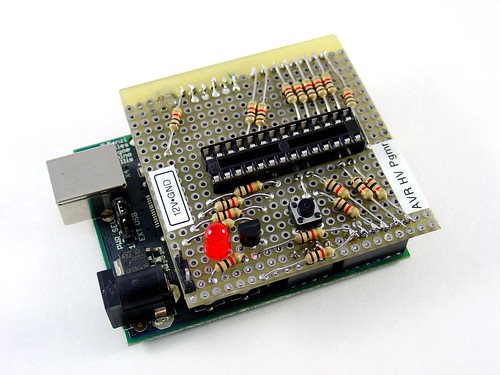
Fortunately, my trusty Arduino came to the rescue – I created an Arduino-based AVR programmer that uses the high voltage programming mode and can fix pesky fuses like RSTDISBL.

The Arduino has just enough IO to implement the entire HV protocol plus a “go” button.  So far I have only implemented setting LFUSE and HFUSE in software, but there is no reason why the code couldn’t be extended to support chip erase and programming the entire flash as well.

Overview:

The fuse programming process is simple:

  • Upload the HVFuse sketch to the Arduino, available for download here: HVFuse.pde
  • Install the shield and apply +12VDC to the terminals on the left
  • Wait for the red LED to turn on (if it isn’t already)
  • Install the ATmega to be repaired
  • Push the button
  • As soon as the LED turns back on, the AVR is fixed and ready to be put back into service!

Schematic:

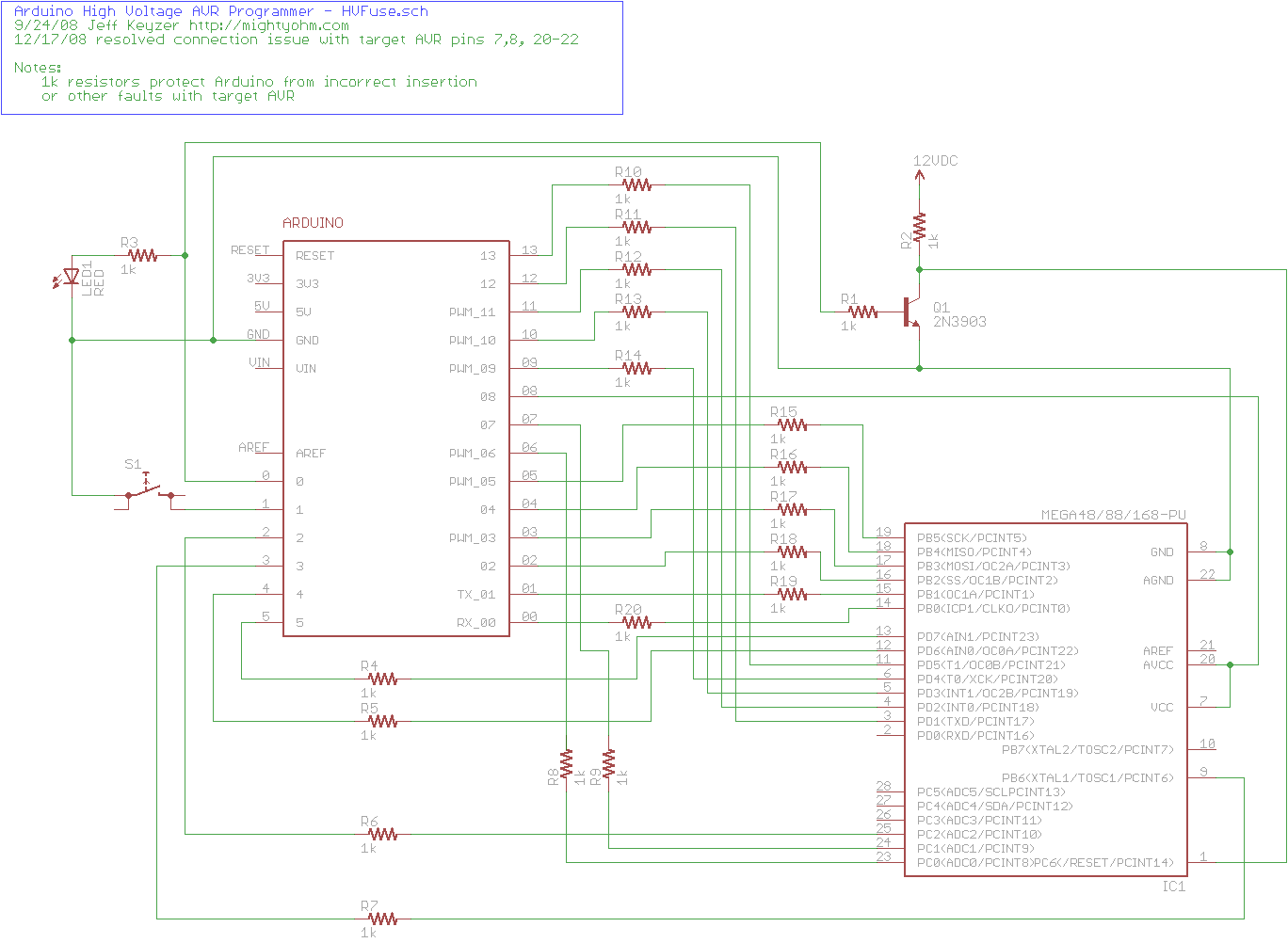
Here is an Eagle schematic of the HV Programming shield (click to enlarge):

Update 12/17/08:  An observant reader pointed out that there were three errors in the way GND/AGND, AREF and VCC/AVCC were connected on the target AVR in the original schematic.  The errors have been fixed and the updated schematic is below.  Apologies for any confusion this caused.

hvfuse_fixed.sch

Parts list:

  • An Arduino NG, Diecimila, or compatible
  • A piece of perfboard cut to size
  • Header pins for the Arduino interface (note I had to drill some of the holes to get the headers to fit the nonstandard pin spacing for digital lines 8-13.
  • An LED which indicates when it is ok to insert/remove the AVR
  • A 2N3903 or similar NPN transistor (2N2222, etc.)
  • (20) 1k resistors – these protect the Arduino from short circuits in case something goes wrong
  • A pushbutton switch – this is the ‘go’ button
  • A 28 pin socket for the target AVR

Kits!

A kit version of this project is available.  Visit the HV Rescue Shield 2 product page for more information.

Arduino – fix your pin spacing!

From the Arduino Diecimila page on arduino.cc:

Physical Characteristics

… Note that the distance between digital pins 7 and 8 is 160 mil (0.16″), not an even multiple of the 100 mil spacing of the other pins.

Seriously, why???  This means you can’t drop a protoboard on top of an Arduino without a lot of pain dealing with digital pins 8-13.

Of course now it’s too late to switch because everyone that has designed shields for the Arduno made them to fit the weird offset between pins 7 and 8.

Grumble…

I programmed the RSTDISBL fuse.

AVR microcontrollers use “fuse bits” to set various operational parameters of the device, such as the speed of the internal oscillator or the watchdog timer settings.

Most fuse bits can be set or reset without worry, that is, they can be flashed into one state and then flashed back again using an SPI programmer like the USBTinyISP.

However, some fuse bits are irreversable or at least awkward to change, similar to the code protection bits on a PIC microcontroller.

One example is the RSTDISBL fuse.  This fuse allows bit 6 of PORTC to be used as a general purpose I/O pin instead of the RESET pin.  Well, it turns out that SPI programmers need the RESET pin to flash the device.  (RESET is set as part of the routine to enter serial programming mode.)  Once the RSTDISBL fuse is set, no more SPI flashing is possible.  The only way to recover is with a high voltage programmer like the STK500, which I don’t have.

Too bad I didn’t realize that beforehand.

At least I’m not the only person who has done this before: http://support.atmel.no/bin/customer?=&action=viewKbEntry&id=13

Update: It’s alive!!!  I made a high voltage parallel programmer out of an Arduino, flashed the fuses back again, and the AVR came back to life.  The parallel programming protocol is well documented in the datasheet for the part and pretty straightforward.  I think I’ll transfer the circuit onto a perfboard just in case I ever need to do this again!