I am a big fan of VirtualBox. I have used it in various forms over the past couple years: to run Windows within Linux, Linux within Windows, Linux within OSX, Windows within OSX, etc. It is fast, powerful, configurable, and best of all, free.
However, there is one major disadvantage to using a virtual machine for hardware development. Sometimes USB devices don’t get along with the VM very well. What’s worse is that sometimes certain combinations of host and guest OS will work for a given USB device, while others won’t. This can make debugging very frustrating!
I recently set up VirtualBox on my Windows 7 x64 PC so that I could run Ubuntu 10.04 alongside Windows. Everything was going great until I plugged in my Adafruit Industries USBTinyISP so I could flash an AVR from within the Ubuntu virtual machine.
Instead of seeing the USBTinyISP show up on the VM, I got something like this:

The USBtinyISP is shown as “State: Captured:” in the VirtualBox USB device menu but there is no checkmark along side it, it doesn’t show up in lsusb, and avrdude can’t find it either.
When I tried to attach the USBtiny in Virtualbox again, I got this error message:

Bad news.
I tried various combinations of relaunching VirtualBox, rebooting, adding USB filters to the VM, unplugging, replugging, etc. No dice.
I decided that there must be an issue with the USB stack running on the USBTinyISP. Most USB devices can handle the hand-off between the Windows host and the Ubuntu virtual machine, but for some reason the USBTinyISP can’t. (It’s also worth mentioning that the Atmel AVRISP mkII programmer doesn’t work with Virtualbox either. It shows up but can’t flash a device. I’ll have to look into this someday, but since I mainly use the USBTinyISP, fixing the AVRISP wasn’t a priority.)
The firmware that powers the Adafruit USBTinyISP is based on Dick Streefland’s usbtiny project. Dick has released a couple more revisions of his code since the v1.3 release that Limor Fried used to create the USBTinyISP v2.0 firmware. There have been a few bug fixes and improvements to the code, including some that address USB enumeration/communication issues. In addition, the usbtiny code now includes a branch specifically for the USBTinyISP. A pre-compiled hex file is provided for easy flashing to an ATtiny2313.
I was hopeful that these fixes might solve my Virtualbox problems, so I downloaded Dick’s new usbtiny-1.5 source and used my spare AVRISP mkII (within Windows) to burn the main.hex file to a spare ATtiny2313.
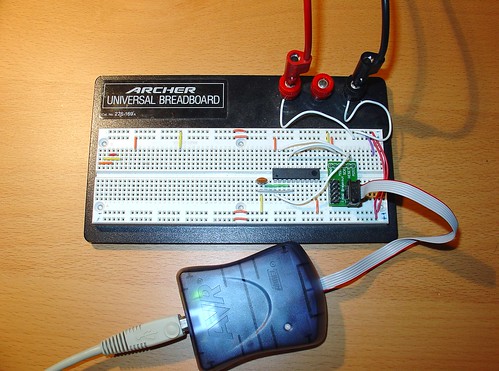
The USBtinyISP source sets the fuses on the ATtiny2313 for an external clock, so I had to wire up a ceramic resonator (small orange blob to the lower left of the AVR) to verify the AVR after setting the fuses. You can see my Sparkfun AVR ISP adapter on the right. I also wired up an external 5V power supply (the test leads at the top of the breadboard).
After burning the new usbtiny-1.5 firmware to the ATtiny2313, I installed it in my USBTinyISP and connected it to my computer.
At first, I still couldn’t get the USBTiny to attach to the VM if I plugged it into my PC and then selected it from VirtualBox’s USB menu.
However, when I created a USB filter in VirtualBox for the USBTinyISP and restarted the VM, it started working! This was a huge improvement over the original firmware, which never worked once, despite all of the combinations I tried!
Here is the USB filter setup, accessible from the VM settings:

Note that the revision is now shown as 0105 (instead of 0104 with the old usbtiny firmware):
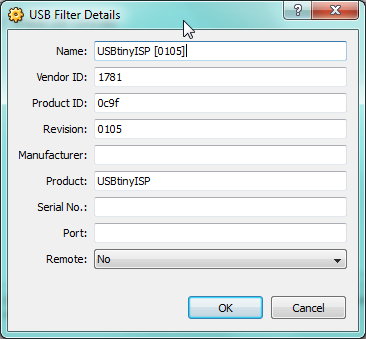
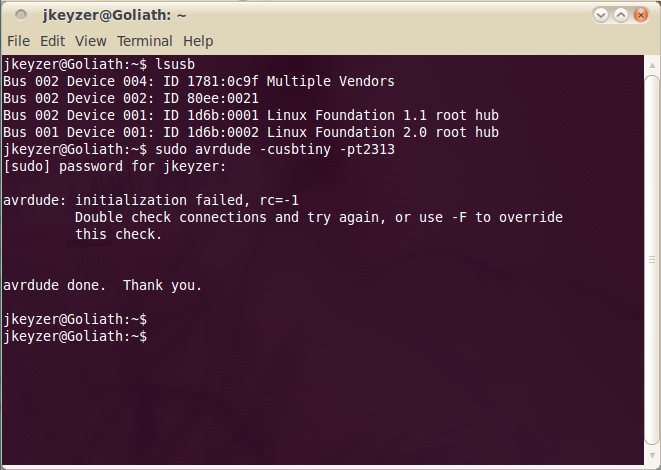
lsusb shows the USBTinyISP (1781:0x9f Multiple Vendors) and avrdude no longer complains about finding the programmer. (The initialization failed message shown below is because I didn’t have an AVR connected.) The red LED on the USBTinyISP flashes when I run avrdude – a sure sign that the VM is communicating with the programmer.

Here is my modified USBTinyISP, with the reflashed ATtiny2313 and shorted R4 & R7 (handy for programming devices that try to pull up/down the SCK/MOSI lines!)
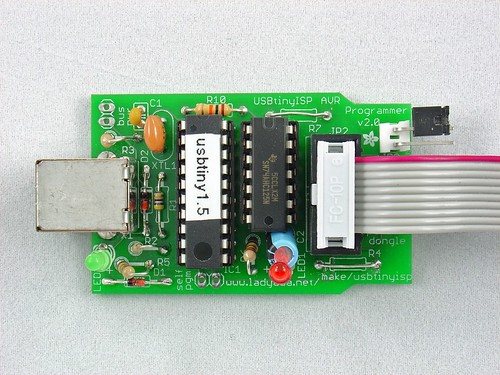
I hope this helps anyone else who is trying to get the USBTinyISP working in Virtualbox on Windows. It may help solve other USB problems as well – the fixes in the newer usbtiny code may apply to other situations as well. If you are having problems with USB and the USBTinyISP, try upgrading the firmware and post your results here!