Tag Archives: AVR

AVR HV Rescue Shield Out of Stock

This week I sold the last AVR HV Rescue Shield kit in stock! This is a significant milestone as it means I have finally sold off all of the kits from the original PCB fab run. At the time I wasn’t sure if anyone would actually buy such a thing, so pulling the trigger on what seemed like a huge number of boards was a leap of faith!

I want to thank everyone who bought kits and PCBs. Thank you for supporting me and the site!

Rather than reorder new boards of the existing design, I am taking this opportunity to re-evaluate my approach to a couple things, with the goal of reducing the BOM cost and lowering the overall cost of the kit.

The bad news is that this means there won’t be any more kits in stock in the short term. I’m planning to release a new PCB design within the next couple weeks, which means kits would be in stock within about a month. Because this is a busy time for me, I can’t promise specific dates, but I will do my best to keep the process moving because I know there are people waiting for the new kits.

If you need a kit right now, I believe Solarbotics still has some in stock.

Otherwise, stay tuned for updates.

And again, if you bought a kit, or even if you built the DIY version with spare parts and helped spread the word, thank you!

– Jeff

Improved firmware for USBTinyISP fixes USB issues

I am a big fan of VirtualBox.  I have used it in various forms over the past couple years: to run Windows within Linux, Linux within Windows, Linux within OSX, Windows within OSX, etc.  It is fast, powerful, configurable, and best of all, free.

However, there is one major disadvantage to using a virtual machine for hardware development.  Sometimes USB devices don’t get along with the VM very well.  What’s worse is that sometimes certain combinations of host and guest OS will work for a given USB device, while others won’t.  This can make debugging very frustrating!

I recently set up VirtualBox on my Windows 7 x64 PC so that I could run Ubuntu 10.04 alongside Windows.  Everything was going great until I plugged in my Adafruit Industries USBTinyISP so I could flash an AVR from within the Ubuntu virtual machine.

Instead of seeing the USBTinyISP show up on the VM, I got something like this:

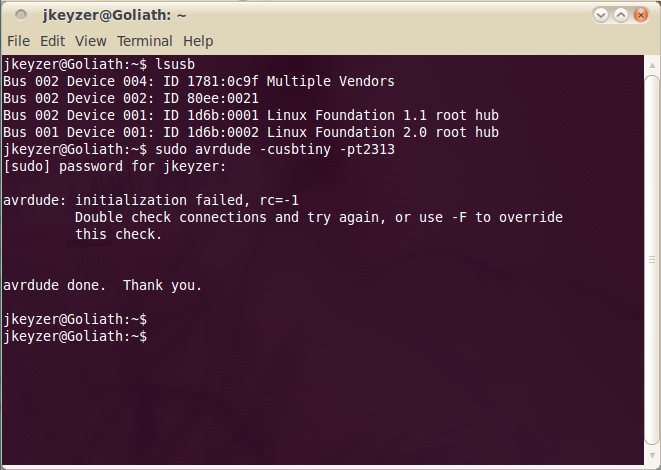
The USBtinyISP is shown as “State: Captured:” in the VirtualBox USB device menu but there is no checkmark along side it, it doesn’t show up in lsusb, and avrdude can’t find it either.

When I tried to attach the USBtiny in Virtualbox again, I got this error message:

Bad news.

I tried various combinations of relaunching VirtualBox, rebooting, adding USB filters to the VM, unplugging, replugging, etc.  No dice.

I decided that there must be an issue with the USB stack running on the USBTinyISP.  Most USB devices can handle the hand-off between the Windows host and the Ubuntu virtual machine, but for some reason the USBTinyISP can’t.  (It’s also worth mentioning that the Atmel AVRISP mkII programmer doesn’t work with Virtualbox either.  It shows up but can’t flash a device.  I’ll have to look into this someday, but since I mainly use the USBTinyISP, fixing the AVRISP wasn’t a priority.)

The firmware that powers the Adafruit USBTinyISP is based on Dick Streefland’s usbtiny project.  Dick has released a couple more revisions of his code since the v1.3 release that Limor Fried used to create the USBTinyISP v2.0 firmware.  There have been a few bug fixes and improvements to the code, including some that address USB enumeration/communication issues.  In addition, the usbtiny code now includes a branch specifically for the USBTinyISP.  A pre-compiled hex file is provided for easy flashing to an ATtiny2313.

I was hopeful that these fixes might solve my Virtualbox problems, so I downloaded Dick’s new usbtiny-1.5 source and used my spare AVRISP mkII (within Windows) to burn the main.hex file to a spare ATtiny2313.
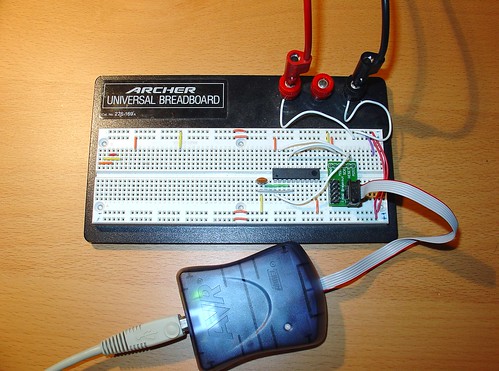
Flashing ATtiny2313

The USBtinyISP source sets the fuses on the ATtiny2313 for an external clock, so  I had to wire up a ceramic resonator (small orange blob to the lower left of the AVR) to verify the AVR after setting the fuses.  You can see my Sparkfun AVR ISP adapter on the right.  I also wired up  an external 5V power supply (the test leads at the top of the breadboard).

After burning the new usbtiny-1.5 firmware to the ATtiny2313, I installed it in my USBTinyISP and connected it to my computer.

At first, I still couldn’t get the USBTiny to attach to the VM if I plugged it into my PC and then selected it from VirtualBox’s USB menu.

However, when I created a USB filter in VirtualBox for the USBTinyISP and restarted the VM, it started working!  This was a huge improvement over the original firmware, which never worked once, despite all of the combinations I tried!

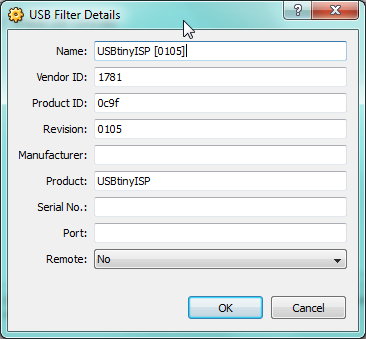
Here is the USB filter setup, accessible from the VM settings:

Note that the revision is now shown as 0105 (instead of 0104 with the old usbtiny firmware):
lsusb shows the USBTinyISP (1781:0x9f Multiple Vendors) and avrdude no longer complains about finding the programmer.  (The initialization failed message shown below is because I didn’t have an AVR connected.)   The red LED on the USBTinyISP flashes when I run avrdude – a sure sign that the VM is communicating with the programmer.

Here is my modified USBTinyISP, with the reflashed ATtiny2313 and shorted R4 & R7 (handy for programming devices that try to pull up/down the SCK/MOSI lines!)
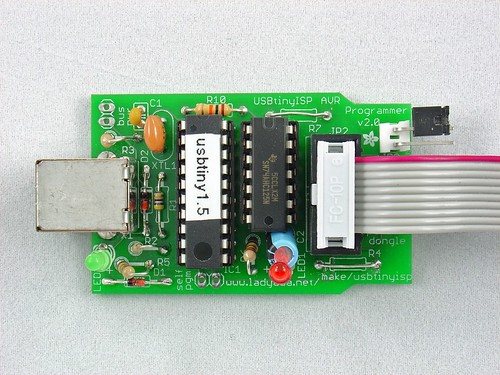
Modified USBTinyISP

I hope this helps anyone else who is trying to get the USBTinyISP working in Virtualbox on Windows.  It may help solve other USB problems as well – the fixes in the newer usbtiny code may apply to other situations as well.  If you are having problems with USB and the USBTinyISP, try upgrading the firmware and post your results here!


Fixed USBTinyISP drivers for 64-bit Windows 7 / Vista x64

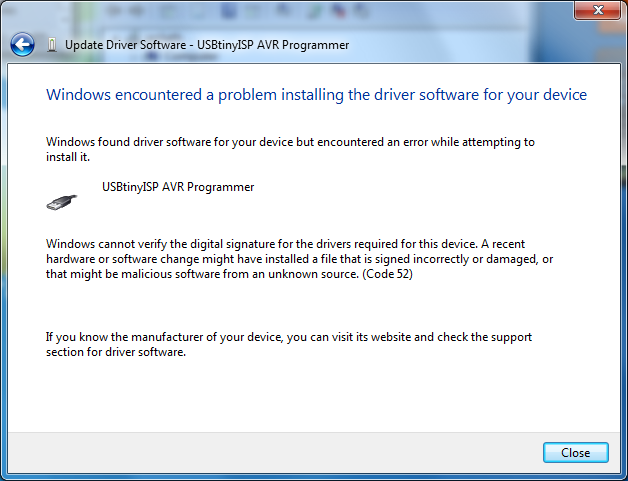
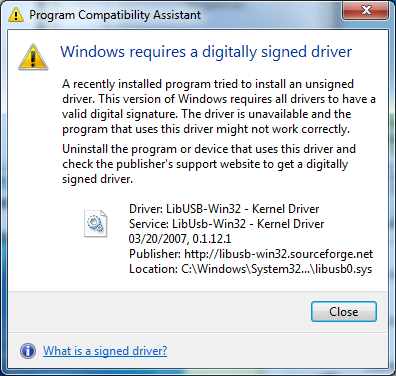
For some time now, those wanting to use the Adafruit Industries USBTinyISP with the 64-bit versions of Windows 7 or Vista were faced with the following errors when attempting to install the device drivers supplied by Adafruit:

For some reason, the 32-bit versions of these operating systems don’t prevent the unsigned drivers from being installed, although they do complain.

There are a few workarounds that involve hacking Windows or disabling digital signature checking, but thanks to a tip by user wayneft on the Adafruit support forums, I was able to make the process much more straightforward.

The USBTiny drivers are based on libusb-win32.  Based on some notes I found on the libusb-win32 wiki, I discovered that the latest libusb drivers contain a proper digital signature:

Vista/7 64 bit are supported from version 1.2.0.0 since a Microsoft KMCS accepted digital signature is embedded in the kernel driver libusb0.sys. libusb-win32 based device drivers can also be submitted for Microsoft WHQL testing. Several companies have successfully finished the WHQL testing with their libusb-win32 based driver package. This will allow the customers to install the driver without a warning under current 32bit/64bit Windows.

This is good news!

I downloaded the latest version of libusb-win32 (1.2.1.0) and used the included inf-wizard tool to create new drivers for the USBTinyISP:

usbtinyisp_libusb-win32_1.2.1.0

I used the Windows device manager to upgrade the broken drivers on my Windows 7 64-bit machine.  There is still a warning that “Windows can’t verify the publisher of this driver software” but there are no more errors about digital signatures and the new drivers appear to install and work correctly.

I haven’t done a huge amount of testing with the drivers, but I was able to communicate with the USBTiny via avrdude and flash a simple program to an AVR.   I also haven’t tested this fix on Vista, as I don’t have access to a computer running it.  If anyone tests these drivers on Vista x64, please post your results in the comments!

Fix for broken avr-size in Ubuntu 10.04 (Lucid Lynx)

If you have never used it before, avr-size is a very useful command that does a relatively simple thing – it tells you how large your compiled avr-gcc programs are.  This is very useful knowledge when you are trying to fit as much code as possible into a part with only a few K of flash memory.  Additionally, the actual flash footprint of an AVR program is not something you can easily distill from a .hex file.  Hex files are usually much larger than the actual compiled code due to the overhead of that file format.

avr-size comes with the binutils-avr package in Ubuntu (and is installed as part of WinAVR and CrossPack on Windows and OSX, respectively).  Unfortunately, Ubuntu 10.04 (Lucid Lynx) ships with a broken version of avr-size that doesn’t include the necessary patches to support the AVR.

To see if your avr-size is working, open a Terminal in Lucid and try executing this command on a compiled avr-gcc .elf file of your choice:

avr-size -C --mcu=attiny2313 main.elf

You’ll probably see something like this:

avr-size: invalid option -- 'C'
Usage: avr-size [option(s)] [file(s)]
Displays the sizes of sections inside binary files
If no input file(s) are specified, a.out is assumed
The options are:
-A|-B     --format={sysv|berkeley}  Select output style (default is berkeley)
-o|-d|-x  --radix={8|10|16}         Display numbers in octal, decimal or hex
-t        --totals                  Display the total sizes (Berkeley only)
--common                  Display total size for *COM* syms
--target=<bfdname>        Set the binary file format
@<file>                   Read options from <file>
-h        --help                    Display this information
-v        --version                 Display the program's version
avr-size: supported targets: elf32-avr elf32-little elf32-big srec symbolsrec verilog tekhex binary ihex

Bad news, but it’s not surprising. You have the broken version of avr-size that comes with binutils-avr for Lucid.

The solution:

I was able to fix this issue by installing the binutils-avr package for Debian Squeeze, an approach I learned about from this Ubuntu bug report.

To download the Debian binutils-avr package, either go to the Debian package repository or execute this command:

wget "http://ftp.us.debian.org/debian/pool/main/b/binutils-avr/binutils-avr_2.20.1-1_amd64.deb"

Now install the package by double clicking on it or executing:

sudo dpkg -i binutils-avr_2.20.1-1_amd64.deb

If you tell Ubuntu to “hold” the package you just installed, it should stop trying to revert to the broken version in the Lucid repository every time you run a system update:

echo "binutils-avr hold" | sudo dpkg --set-selections

You can check the hold status by running

sudo dpkg --get-selections | grep binutils-avr

The status should be shown as “hold” (not “install”).

Now if you run avr-size, you should see the special AVR option ‘-C’ is now present.

jkeyzer@atom:~$ avr-size --help

Usage: avr-size [option(s)] [file(s)]
Displays the sizes of sections inside binary files
If no input file(s) are specified, a.out is assumed
The options are:
-A|-B|-C  --format={sysv|berkeley|avr}  Select output style (default is berkeley)
--mcu=<avrmcu>            MCU name for AVR format only
-o|-d|-x  --radix={8|10|16}         Display numbers in octal, decimal or hex
-t        --totals                  Display the total sizes (Berkeley only)
--common                  Display total size for *COM* syms
--target=<bfdname>        Set the binary file format
@<file>                   Read options from <file>
-h        --help                    Display this information
-v        --version                 Display the program's version
avr-size: supported targets: elf32-avr coff-avr coff-ext-avr elf32-little elf32-big srec symbolsrec verilog tekhex binary ihex

Report bugs to <http://www.sourceware.org/bugzilla/>

You can also test it out on a compiled .elf file:

jkeyzer@atom:~$ avr-size -C --mcu=attiny2313 main.elf

AVR Memory Usage
----------------
Device: attiny2313

Program: 2008 bytes (98.0% Full)
(.text + .data + .bootloader)

Data: 23 bytes (18.0% Full)
(.data + .bss + .noinit)

It works!  You now have a working avr-size command for Ubuntu.

There is a good chance this package will eventually be fixed in the Lucid repository, but based on the bug report above, it could be a while (2012?) before we see an update.  Until then, installing the Debian package seems to be a good solution.

If anyone reading this is close to the Ubuntu package maintainers, can you please kick them about this issue?

AVR HV Rescue Shield Code Update 1.2

Version 1.2 of the Arduino sketch that powers the AVR HV Rescue Shield is now available for download.

The revised sketch now displays the target AVR’s existing fuse settings before asking you for new ones.

I also cleaned up and reworked the code in a couple places, but these changes shouldn’t affect the existing functionality.

If you have any issues or questions about the new code, post them in the support forum or contact me directly.