All posts by Jeff

Electrical engineer, tinkerer, maker.

Datasheet Hell

I would love to know what this datasheet says because I’d like to use this part in a project.

Details such as “the part will self ignite if you hook it up thusly” would be particularly helpful.

Can anyone read Russian (Cyrillic)?

Update:

Thanks to everyone who stepped up to translate the datasheet!  You guys are awesome!

Here is a photo of the tube that I am pretty sure goes with the datasheet above.  It’s a CI-3BG Glass Geiger Müller Tube from Electronics Goldmine.

Electronics Goldmine’s description mentions that this tube is intended to detect gamma rays.  Based on the translations, this is true, but the tube appears to be sensitive to beta radiation as well.  This is one of the things I was hoping to learn from the datasheet, in addition to the driver requirements and any hints about it’s original application.

The unique part about this tube (to me) is that the envelope is made of glass, and the “active area” (or whatever it is called) is fairly small – this is perhaps consistent with the intended application in very high radiation environments.  If anyone knows anything else about these tubes and their differences compared to more “traditional” metal-can Geiger tubes, please leave a comment!

No idea what I am talking about?  Wikipedia to the rescue!

Announcing the MightyOhm.com Wiki

I am pleased to announce that the MightyOhm Wiki is now online and open to the public.

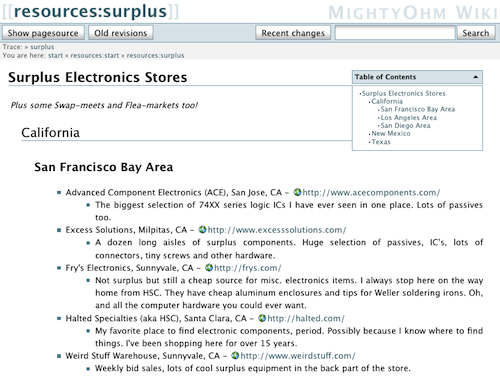
While there isn’t a ton of content yet, my hope is that the wiki will become a useful means to share information and resources relevant to the site.  At the moment, there are pages for electronics vendors, hardware/software tools, and PCB manufacturers.

Another page I have been working on for a while is the surplus directory, which lists surplus electronics stores around the country.  If you have a favorite surplus goldmine in your area, please create an account and add it to the wiki!

MightyOhm Has a Wiki.  Check it out.

Gary’s Wifi Radio Project

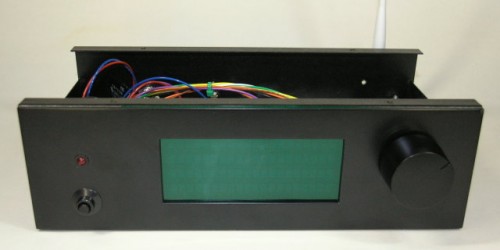
Gary Dion (N4TXI) created a Wifi Radio to match his entertainment center.  His project is inspired by my original Wifi Radio project and shares several of the same parts (such as the Asus WL-520gU wireless router) and design philosophy.

Interesting features of Gary’s version of the radio:

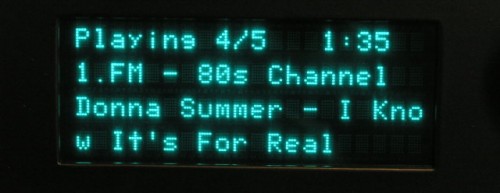
  • Very cool 4 line VFD display allows more information to be shown at once (and it’s blue!)
  • AVR sends actual shell commands to the router, which allows the serial console to remain enabled for debugging/other purposes – brilliant!
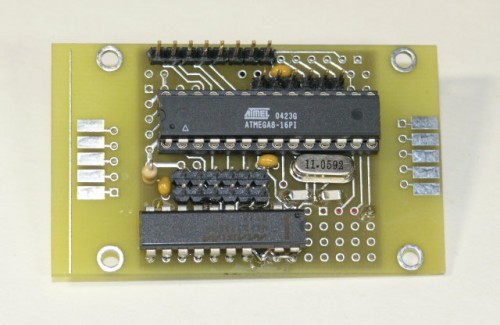
  • Nice custom PCB for the ATmega8 microcontroller
  • Rotary encoder and significantly more advanced control menus
  • IR remote control support!

More details, photos, and source code are available on Gary’s site.

Thanks to the Make: blog for bringing this project to my attention!

Debugging (David Agans)

I recently saw David Agans’ book Debugging mentioned in one of the many trade journals I receive (I can’t remember which one).  After seeing how much praise it received on amazon.com, I decided to pick up a copy.

Debugging really spoke to me because a large portion of my career has been devoted to finding and fixing hardware bugs.  I finished it in just two or three evenings (it’s a quick, fun and engaging read).  The examples are particularly interesting and relevant to me because many involve issues with embedded systems.  Admittedly, perhaps most fascinating is the one about a living room lamp that turned on anytime the author vacuumed the room.

I highly recommend this book to anyone who regularly  troubleshoots issues with any kind of system, software or hardware, mechanical or electrical.  This includes engineers of all discplines, circuit designers, computer programmers, helpdesk operators, web developers, auto mechanics, etc.

David’s nine rules of debugging are (with my notes):

  1. Understand the system – Knowing how your circuit, code, or widget is supposed to work will help you fix it.  Read the manual!
  2. Make it fail – Knowing how to reproduce the failure is critical to being able to fix it.  Also, stimulate the failure, don’t simulate it.
  3. Quit thinking and look – Don’t jump to conclusions and just fix what you think might be the problem.  This wastes time when you inevitably guess wrong.  Keep an open mind as to what the failure mechanisms could be.
  4. Divide and conquer -Eliminate what is definitely not part of the problem and focus on what’s left.
  5. Change one thing at a time – If you change ten things at once, how will you know which one actually solved the problem?
  6. Keep an audit trail – Being able to reproduce the fix is crucial.  Even if you don’t fix the problem, you might discover a pattern or something you overlooked by looking at your notes.
  7. Check the plug – When all else fails, check the obvious stuff that you probably should have looked at first.
  8. Get a fresh view – Someone else may have more experience with the problem than you do or might see the one thing you’re missing.
  9. If you didn’t fix it, it ain’t fixed. –  Don’t stop when the problem just disappears.  It will surely come back later at the most inconvenient time possible.  We’ve all been bitten by this one before.  Never again!

There’s even a free poster available on the book’s website to help you remember these rules during your next debugging crisis.