Pete Harrison at Micromouse Online wrote a short tutorial about using Eclipse to program AVRs. Eclipse is an open source IDE that is supported on many platforms, including OS X on the Mac.
I have never used Eclipse myself, so I can’t vouch for how well this works, but I would like to upgrade from the command line tools I am using (part of AVRMacPack, which is now called CrossPack). I could use Apple’s Xcode but last time I checked, the AVR integration in Xcode wasn’t that great.
Is anyone using Eclipse for AVR development? What do you like/dislike about it?
I don’t know why it took so long, but recently someone turned me onto The Fat Man and Circuit Girl show, which has been airing on the net for almost six months now. This is definitely the quirkiest and most entertaining electronics themed webcast I have ever seen. The episode above includes an awesome segment about making a floppy drive reverb machine and thoughts on brewing coffee with PID, which reminded me of some other projects I have worked on…
Self taught electrical engineer. Designer of the C64 DTV.
I had a chance to meet George and Jeri at NOTACON in Cleveland this month. They are as entertaining in person as they are on video! Jeri told me that she will be at the Maker Faire in San Mateo this year, showing off her Easy-Bake Chip Lab. I am really looking forward to seeing it!
This week, my brother is relocating from the San Francico Bay Area to Texarkana, Texas. I’m helping him move, so for the next two weeks we’ll be on a road trip through California, Arizona, New Mexico, Texas, and maybe a little bit of Oklahoma. We’re planning to see the Very Large Array, visit Truth or Consequences, and check out The Black Hole in Los Alamos. That is, if the trailer stays connected and we don’t break down too many times on the way.
I though this would be a good opportunity to dust off my APRS tracker so friends and family can watch our progress.
What is APRS?
APRS, short for Automatic Packet Reporting System, is a radio network that uses amateur radio frequencies to relay short messages. Think of it as a precursor to twitter, developed 20+ years ago by Bob Bruinga, WB4APR. The messages usually contain GPS coordinates, and they are relayed via radio to internet connected stations that send the data to the APRS-IS network. Database servers, such as findU, cache the packets so that client software can access them without needing a radio or realtime access to the network.
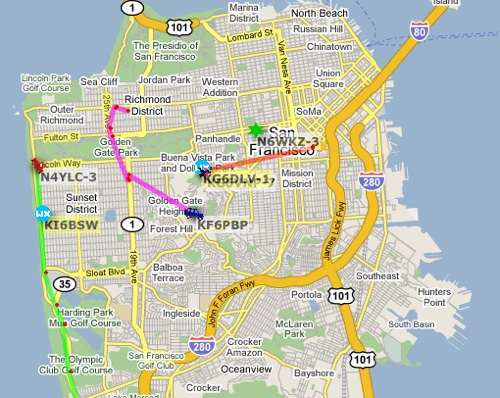
The coolest client I have seen so far is aprs.fi, a clever mashup of APRS and Google Maps:
APRS map of San Francisco
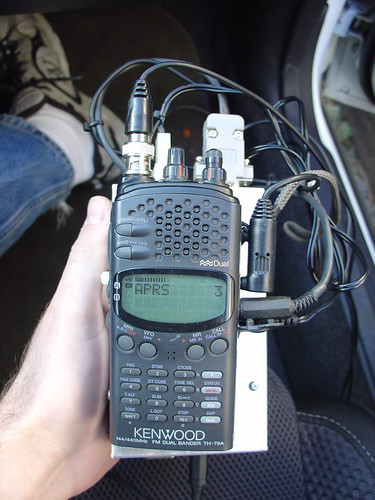
The hardware:
I made this APRS tracking box a couple years ago, so I’m a little fuzzy on the construction details, but it consists of the following parts:
An aluminum box, probably the most expensive part.
Some cables to glue all the pieces together, mostly salvaged from my junk box.
The APRS tracker acquires a GPS fix and the current GPS time. Every so often (fully configurable), it transmits my position over the radio, where it is received by other APRS relay stations in the area. Speed, direction, and altitude are also included with the position packet. I connected a piezo buzzer to the TX signal so I hear a beep when the position is transmitted. Within a few minutes, a point corresponding to the position shows up on the map at aprs.fi or in the findu database.
It’s really neat to play with, especially on long trips. On a trip to Moab two years ago, my position was received by the APRS network even in areas with no cell coverage, which included most of Utah!
Note that to use the APRS system, you need to have an amateur radio license. If you’ve ever been interested in amateur radio, this is a really good reason to get your license and start experimenting!
The Bay Area Maker Faire is only 30 days away, and I still have lots to do on my Wifi Radio before it’s ready for the show.
I figure two weeks of slacking and two weeks of panicked chaos should do it…
Tickets are on sale, if you book before May 20th you get a $20 discount. I hope to see some readers there, if you read the blog please stop by and say hello!


 and start experimenting!