Category Archives: Books and Resources

Book recommendations, reviews, notes, etc.

LTspice Class Slides and Keyboard Shortcuts

LTspice 2009 World Tour

Yesterday I drove down to Linear Technology in Milpitas for a free LTspice IV Seminar, hosted by electronics distributor Nu Horizons.

The seminar was led by LTspice author and advocate Mike Engelhardt.  For someone like me who has never used LTspice before but wanted to see what all the fuss was about, the seminar was an extremely informative introduction to what appears to be a very powerful and well-supported design tool based on Berkeley SPICE.  Mike claims that in most cases, LTspice is the fastest SPICE simulator around, making it the industry leader both in price (it’s free) and performance.

The best part?

After the seminar, Michael Payne of Nu Horizons sent out a link to the class slides and example files as well as a list of useful LTSpice Keyboard Shortcuts.  So even if you missed the class (or the tour didn’t include your part of the world), you can still learn about the circuit simulation tool that has been making waves in the open source hardware community.

Coombs: Printed Circuits Handbook

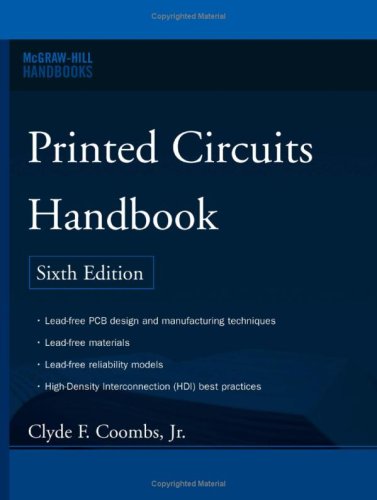
Printed Circuits Handbook

If The Art of Electronics is the bible of electronic circuit design, then the Printed Circuits Handbook is almost certainly the bible of printed circuit board (PCB) technology.

I say this because even if you disregard the volumes of useful information inside (much of which I have never seen elsewhere online or in print), this book deserves to win ‘bible’ status thanks to its 1000 pages and phonebook-quality heft!

All joking aside, this book is a great resource for anyone is serious about making good PCBs.  I have worked with PCBs as a design engineer for several years now, and I learned something about printed circuit boards within minutes of opening the cover.  Hours later, I was still flipping pages.

How could I walk away from a book that contains in depth discussions of topics like the difference between water soluble and no-clean flux and how to clean the leftover residue from each?  Ever wondered what the myriad of surface finish options your PCB vendor offers you really mean?  This book will explain the difference between HASL and ENIG, and why you shouldn’t blindly check the box that says “lead-free” without considering the consequences on your assembly process.

This is the kind of stuff they don’t teach you in school, and as a design engineer I have received only glimpses of in the industry.

Some of the highlights of this book for me are:

  • The most thorough discussion of PCB manufacturing that I have ever seen (almost 300 pages!).  Want to know how the PCB you just got was made?  One layer or sixteen layers, it’s all in here.
  • Lots of information about custom laminates, high density interconnect techniques, microvias, blind/buried vias, plating and surface finishes, solder masks, conformal coating, etc.
  • Several charts of current handling ability of PCB traces, planes, and vias.
  • A chapter on thermal design of PCBs.
  • Lots of information about soldering techniques.  Ever wondered how soldering works and what flux really does?  It’s in here too.
  • Seven (!) chapters on design, manufacturing, and test of flex circuits.

Be forewarned that the technical level of this book is fairly high.  It is clearly targeted towards people working in the PCB industry, but most engineers and even serious hobbyists would probably get something out of it.  That said, this is definitely not a book for beginners!

(And to the other design engineers out there: Want to one-up the manufacturing and reliability guys in the break room?  Read this book!  :-))

Printed Circuits Handbook (McGraw Hill Handbooks)

SVG Circuit Symbol Library

SVG Circuit Symbols

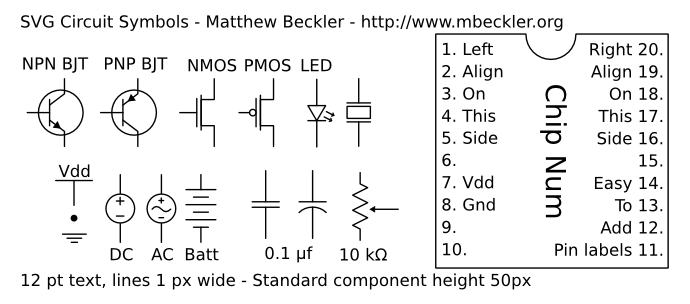
Matthew Beckler has released a library of electronic component symbols in SVG format, which will make it easy for anyone with the vector drawing program Inkscape to create schematic diagrams quickly and easily.  I have been meaning to learn Inkscape for the sole purpose of making prettier schematics, so this library will definitely come in handy.

Matthew says:

Sometimes you need to create a circuit schematic, but don’t need or want to take the time to do it Right, using a real schematic capture program like OrCad, Eagle, or Kicad. In those situations, I like to use Inkscape to draw circuit schematics. I have collected and standardized the symbols shown below in high-quality SVG format. The components are standardized to have lines 1 pixel wide, 12 pt text, and 50 pixels in length. The IC symbol has pin label text that is easy to customize.

SVG Circuit Symbols :: mbeckler.org

(via Make:)

Teleport allows keyboard/mouse sharing between Macs

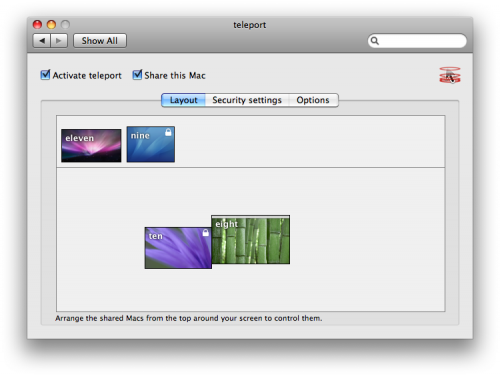
teleport

Teleport is a program for OS X that lets you share one keyboard and mouse between multiple computers – very handy for when you want to turn a macbook into a makeshift second display for your Mac desktop.  Before I discovered teleport, I was using synergy, which achieves almost the same result but requires an open Terminal window to launch and use it (synergy’s daemon functionality is broken in Leopard).  Teleport has some other advantages over synergy, including drag and drop file support (really cool!) and working mouse-wheel scrolling.

I initially had some problems with a short delay when moving the mouse from my desktop to the remote display, but I quickly resolved this by making a couple changes to the teleport configuration:

  1. Uncheck “Show bezel when controlling shared Mac” in the teleport control panel options, as shown below.  This actually makes a noticeable difference.
  2. teleport_config

  3. Disable the switch animation by executing this command in a Terminal window:
    defaults write com.abyssoft.teleport showSwitchAnimation NO

Now my pointer moves almost instantaneously from one display to the next, even with one machine on Wi-Fi.  Curiously, I only had to make the changes on the server side, I left the client machine preferences alone.

Hopefully this will help other folks who are having the same issue.

abyssoft – teleport.