Category Archives: Projects

Harrison’s Box

A little over a year ago, I became an Uncle.

This is my nephew, Harrison.

Harrison

For his first birthday, Harrison’s Mom wanted to give him something really special.  Not just an ordinary toy for a one year old, but something strange and wonderful, tactile, interactive, unique.  Thus was born the idea of an “electric box”, an electronic contraption full of switches, lights, buttons, knobs, levers, and sounds.

An elite task force was assembled to create this special gift, codenamed “Harrison’s Box”.  The team consisted of Grandpa, the Woodworker, Jeff (alias mightyohm) the Engineer, and Kylie, the Project Manager.

Upon defining the project, we immediately jumped into phase one, Procrastination.  Deliverables were met, and as the birthday loomed closer, we eased into phase two, Git ‘er’ Done.

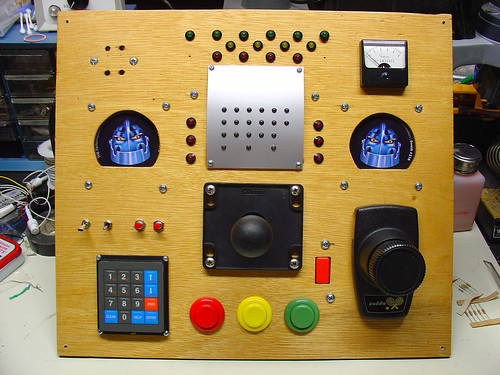
Supplies and materials were ordered, wood chips started flying, and soldering irons blazed.  A short time later, the front panel was realized:
Harrison's Box

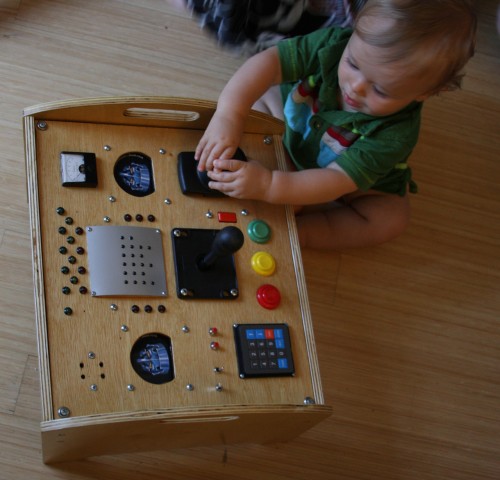
Harrison’s box consists of (clockwise from the upper left):

  • A buzzer (sound comes out the four holes)
  • A group of red, yellow, and green LEDs that respond to button pushes below
  • A panel meter (for looks!) from the junkbox
  • A pair of robots with blinking red eyes (aka tradeshow schwag)
  • A pong controller, scrounged at the Prototype This! garage sale on Treasure Island
  • Three large, brightly-colored arcade-style pushbuttons and a large joystick
  • A numeric keypad
  • Some random buttons and switches

Almost all of the electronic components, including the arcade buttons and joystick, were sourced from All Electronics.  A few odds and ends came from my junkbox.

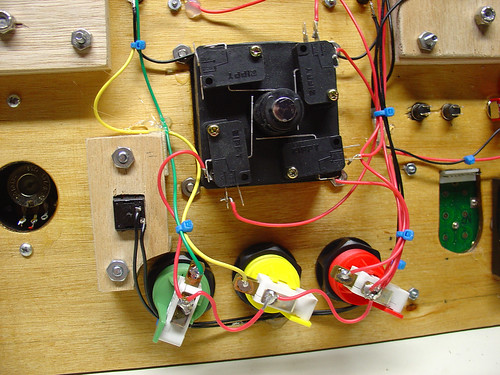
The wiring is point to point – zipties and hot glue keep all of the individual wires in place.  Here’s a shot of the wiring for the pushbuttons and the joystick.
Harrison's Box

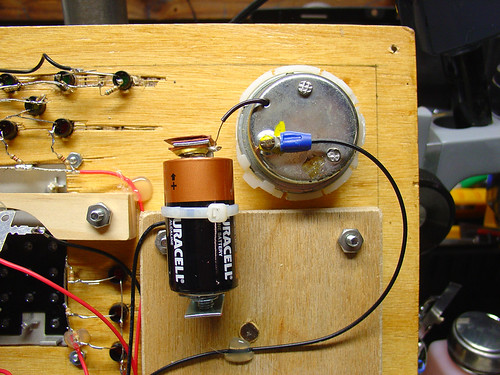
The buzzer consists of the guts of a cheap bicycle buzzer and a single C cell battery to power it.  Some creative wiring allows a pushbutton elsewhere on the panel to control the buzzer.
Harrison's Box

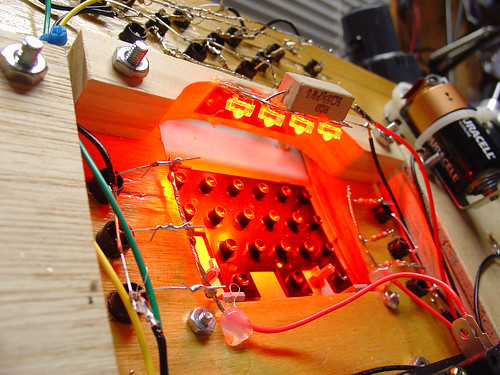
I salvaged a few high brightness red LEDs from a surplus automotive taillight assembly I picked up at Weird Stuff a few years ago.  A 5 Watt power resistor I had in my junkbox limits the current to the LEDs to a bright but not blinding level.
Harrison's Box

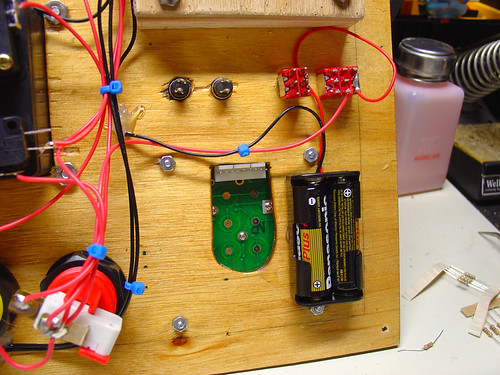
The whole box (with the exception of the buzzer, as noted above) is powered by a pair of AA batteries.
Harrison's Box

Finally, the big day arrived, and it was time to present Harrison (and Mom) with his gift:

Opening the box

Initially the Box was met with some skepticism.  Perhaps Harrison was dwelling on the simple question: Toy or thermonuclear device?  Understandably, there were very cautious button pushes at first.

3544021447_82d005ab4a_o

Moments later, knobs were being turned, switches switched, buttons pushed, and Harrison had learned how to use the joystick.  Look out Steve Wiebe!

Harrison!

The front panel mounts to a small stand that conceals and protects the wiring while also giving Harrison something to hold onto while operating the Box.
Harrison plays with his box

I’m happy to report that Harrison’s Box was a success.

Check out more pictures of the box on flickr.
Tony’s Diamond Chop Saw (Part 1)

dicer_small
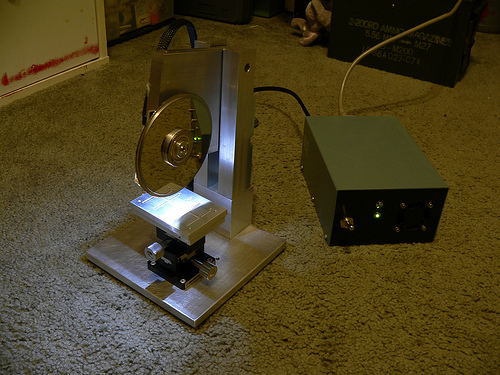
This is guest blogger Tony reporting on my latest project, a very small, precise circular chop saw.  Why would anyone want to build such a saw you might ask?  Well, to make parts for another project of course!

So here’s the background….I’m building a ham radio that operates at 47 GHz.  At such a high frequency there are very few components that can be soldered on to circuit boards, let alone components that even come packaged!  The easiest way to build a high performance radio at these frequencies is to use MMICs (Monolithic Microwave Integrated Circuits).   These are really just fancy, yet fairly simple circuits made from exotic materials, most commonly Gallium Arsenide (GaAs) instead of the usual Silicon used for normal chips.  Before MMICs were in widespread use, individual transistors had to be used, requiring delicate and hard to make external matching elements.  MMICs are like nice little 50 ohm building blocks.  Low Noise Amplifiers (LNAs), mixers, Power Amplifiers (PAs), phase shifters, etc. etc. are all available in this form.  Trouble is that you have to connect these pieces up to make a functional radio (or at least the microwave portion of it).

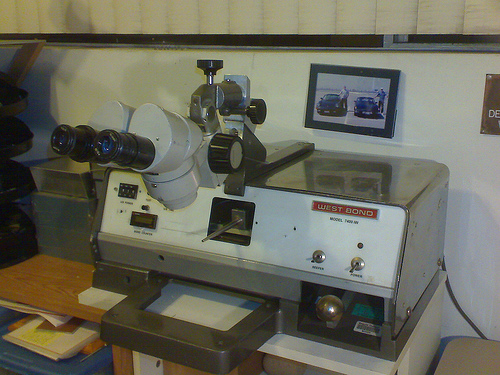
My WestBond wedge bonder

Wire bonding is the usual method for connection and is really just a method of welding a wire (or ribbon) from one chip to the next.  It turns out that you actually need space in between the chips, for thermal reasons, RF reasons, and for placing the requisite bypass capacitors.  So what goes in between the chips?  Well, coax cable is pretty much out, and most common circuit board materials start getting pretty lossy at 10+ GHz, and even the good stuff (PTFE-based usually) starts getting kinda lousy at 40+ GHz.   At very high frequencies, materials like ceramics and quartz become worthwhile.  In my radio I chose to use pre-made alumina ceramic substrates (tiny circuit boards).   These come with a gold layer on the back, and a gold line on top etched to perform as a 50 ohm transmission line (just like coax and just what the MMICs want to see).  I bought these with a number of other hams last year in a group buy.  They are fairly expensive being that they are 5 and 10 mils thick!

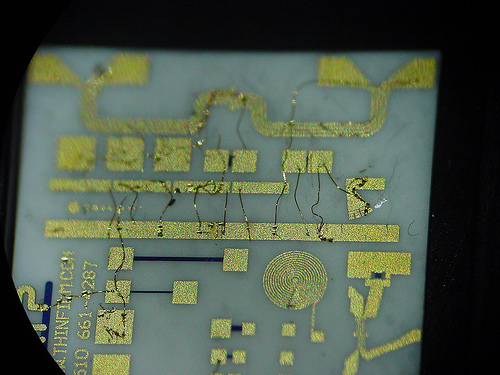
test bonds
My first test bonds on an alumina ceramic substrate (ugly)

To make the best use of the sections that I bought I decided I needed to cut them to length.  Well how do I do that?  The thickest pieces are 10 mils thick (a piece of printer paper is 4 mils thick) and they are brittle!  Beyond cutting, how do I hold the piece while cutting and when it’s done?  The resulting pieces may be just 100 mils long, and 50 mils wide.   Obviously a pair of vice-grips simply won’t do.

So my first thought was a Dremel tool and tape.  This method could work, but it does not lend itself well to making measured cuts.  At 47 GHz, a few hundredths of an inch is a lot! Also, the available diamond blades for dremel tools are fairly wide and I wanted to waste as little of the  small substrates as possible.  At this point I made  a lucky find on eBay.

In the semiconductor industry, one of the last steps of making a chip is called “wafer dicing.”  After a wafer full of chips is made, they need to be cut out into individual parts.  To do this, wafer dicing machines were developed.  These are CNC saws that use a high speed (as high as 60,000 rpm) air bearing spindles with diamond abrasive blades.   They can cut lines across large dinner plate sized wafers that are as narrow as only a few tens of microns.   Luckily there is enough wafer dicing going on in the world that there is a source of surplus blades on eBay.  Not all blades are well suited for all materials, so do some research if you are interested.  Disco (a Japanese company) is one of the largest dicing blade manufacturers.

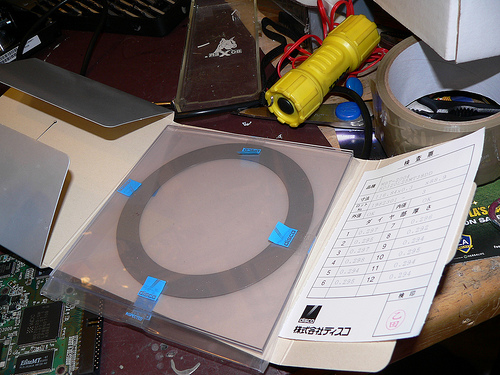
dicingblade
Large (4.6 inch diameter) wafer dicing blade in it's packaging.

While reading the last paragraph you may have spotted a few words indicating unobtanium.  Those words are “high speed air bearing spindle.”   Well I chose to use a hard drive motor instead, because they have excellent bearings and are readily availble  for free.  While they don’t move as fast, I don’t care.  I have a few short cuts to make, not millions of chips.

So that is an introduction to what I’m doing.  For the most part the saw has been built using surplus parts and remnant pieces of metal from my favorite local metal supply house M&K Metals in lovely Gardena, CA.   As of this entry, the saw is nearly complete, all that is left is the splash guards.  I’ll be posting the build of this project in several parts, so stay tuned.

And a link to my Flickr photo set for this project: Dicing saw

-Tony

Celebrating one year of hacks and projects at mightyohm.com!

Wow!  I can’t believe it’s been a year!

Based on the date of my first post, last Wednesday marked the one year anniversary of my blog.

While I pour a toast, here are a few highlights of the past year:

PID Controlled Solder Paste Fridge

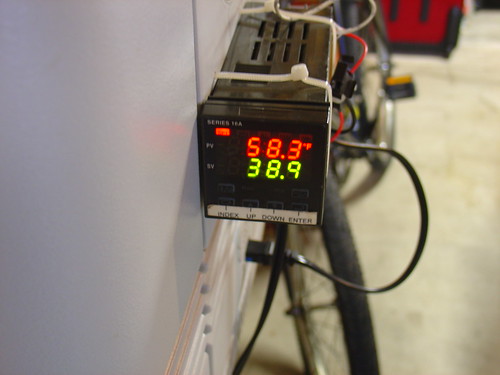
PID Controller closeup

The first project I documented on the site, my solder paste fridge was the end result of a weekend effort to turn an old beer chest into a PID-controlled Peltier cooler for storing tubes of solder paste. A year later, the cooler has a permanent home under my workbench and is still going strong, keeping its contents at a chilly 36 degrees F. Besides solder paste, I keep my POR-15 rust proofing epoxy paint and a few tubes of superglue in the fridge (they never dry out!).
Space Invaders!  Making RGB video with the PIC

I needed an excuse to learn assembly language programming on the PIC, and this project fit the bill perfectly.  Instead of slogging through yet another PIC tutorial I decided to “just do it” and the video above shows the result.  One of my favorite projects of last year, I have plans to build more of these and make some electronic artwork for the lab.

Bluetooth Handset Hack

Charging

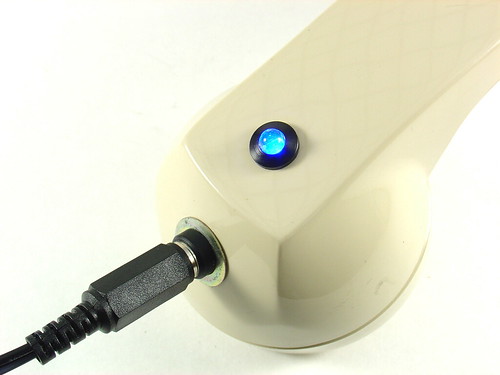
One aging bluetooth headset plus one obsolete telephone handset equals one retro-fabulous hack that I still use today.  The best part: Look for this one in Make: volume 20!

DIY PID-Controlled Soldering Hotplate

PID Controlled Hotplate

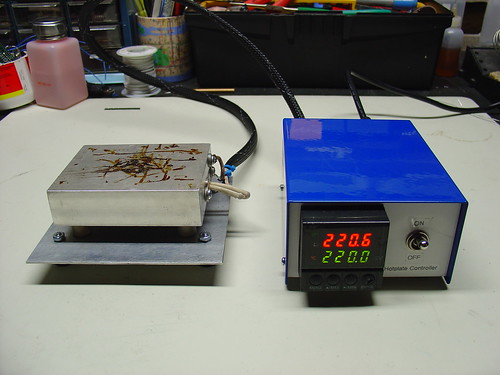
I’m a big fan of the hotplate (aka reflow skillet) method of surface mount soldering.  Over the course of a few months I designed, machined, and assembled this PID-controlled soldering hotplate to help build the first few prototypes of my AVR HV Rescue Shield kit.  Hacking around in the garage is always fun, but creating a new tool is one of the most rewarding things I have can think of.

Here’s a video of the hotplate in action, reflowing the step-up converter on the Rescue Shield:

The AVR HV Rescue Shield

AVR HV Rescue Shield

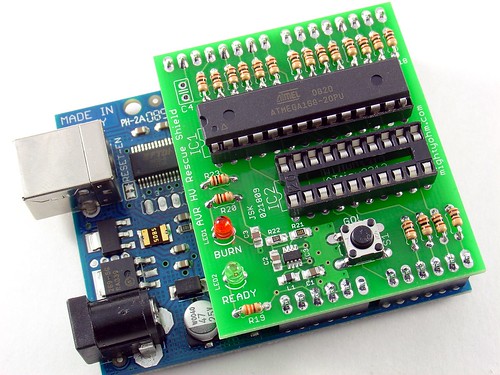
What started as a simple hack to save a crippled AVR microcontroller eventually became a kit that I’ve sold to AVR enthusiasts around the world.  The AVR HV Rescue Shield includes a cool custom PCB, integrated 5V-12V step-up power supply, and is completely open source.   I only made one batch of these, and when they’re gone, they’re gone, so head over to the AVR HV Rescue Shield product page to order one today!

Wifi Radio Project

Finished Wifi Radio

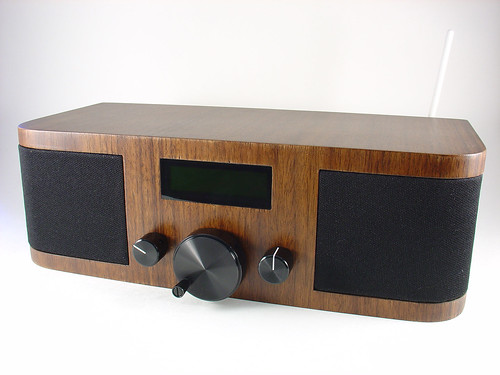
Certainly the most famous project on the site, my Wifi Radio project has inspired many readers to start playing with cheap wireless routers and embedded Linux.  If you haven’t seen it before, the finished project sounds something like this:

I brought the Wifi Radio to the Maker Faire in San Mateo in May.  Everyone loved it, including some of the Make: staff, which got me a blue ribbon for the project.  Awesome!

Onward!

Well, that’s it for year one…  If I missed one of your favorite posts from the past year, leave a comment!  If you’re new to the blog, happy reading, you have some catching up to do.  🙂

Here’s to another fantastic year of hacks, projects, kits, tools, and resources at mightyohm.com!

Building a Wifi Radio? Leave a comment here!

Did my Wifi Radio project inspire you to buy a wireless router and start hacking?  If so, I’d like to hear from you!

Leave a comment below and let me know how your project is coming along.  Even if you’re not building a Wifi Radio but used my firmware or tutorials as a starting point (a great example is the Tweet-a-Watt), I’d love to hear from you.

If you have photos of your project, you can share them with the world by adding them to the Asus Wireless Router Hacks photo pool on flickr.

Wifi Radio Cost Breakdown

Many people have asked me for a cost breakdown of my Wifi Radio project.  Well, here it is!

I added a link to possible sources for as many parts as I could.  However, there were a few things I scrounged from local surplus electronics stores and couldn’t easily find a good equivalent online.  I’m not expecting everyone to copy my design exactly (not everyone has a woodworking shop at their disposal), so use these numbers as a rough estimate only.

If you shop around you should be able to beat the listed prices on many items, so I see this as sort of a worst case scenario.

To flash the wireless router and create a minimal radio (with no user interface), you will need:

Total: $65.48

To make the LCD display and tuner interface, you’ll also need:

Total: $52.06

(This is on the high end, the interface can certainly be built for less by using scrounged/surplus components.)

To make the finished radio, add:

  • Volume and tune knobs – ~$2 @ HSC
  • Cool tuner knob$8.55
  • 5V/12V power supply brick – $10 @ Weird Stuff
  • 5-pin mini-DIN power connector – ~$3 @ HSC
  • Power switch – ~$1 @ HSC
  • Cheap set of PC speakers (gutted for the speakers and amplifier) – $5 @ Weird Stuff

Total: $29.55

Oh yeah, and I almost forgot…

  • An awesome friend named Tony with a full woodworking shop in his garage who will make you a killer wooden enclosure for free – $priceless

Grand total (excluding the box) – $147.09

If you take out the cost of the development tools, namely the FTDI cable and the USBtinyISP, the total comes out to $105 (without the box).

By scrounging materials and using parts from your junkbox you should be able to reduce that figure even more, but obviously the grand total hinges on what kind of enclosure you use.  Not everyone has a friend with serious woodworking skills willing to donate time and materials, but use this as an excuse to get creative.

I wanted a box that showcased the time and effort that I spent on the electronics inside, but that doesn’t mean an old boombox from the Salvation Army couldn’t work just as well.

When I first started this project, my goal was to keep the total parts cost under $100.  On paper, it looks like I came pretty close to that, thanks to the donated box and excluding the reusable development tools like the FTDI cable and AVR programmer.  To be honest, I probably spent twice that amount on spare power supplies, extra knobs, a second router to bring to NOTACON, and a bunch of other stuff that I didn’t end up using in the final project.  But I’m pretty ok with that.  I think this just highlights the fact that:

If you just want a Wifi Radio, it will always be cheaper to buy one off the shelf. But if you make your own, it will be infinitely more rewarding.

It certainly has been for me.  🙂